Crafting a coding harness
In the simplest way of defining it, a harness is a system that surrounds your model and manages how it interacts with the environment. For a coding harness, that means making a model interact with your codebase via tools like read/write/bash etc. —it can be only bash tool too! e.g. mini-swe-agent— and feeding the tool results back to the model so it can keep working on the codebase. Depending on the harness it can also handle permissions, cloud environment, model context, project/global memory, skills, multi agent-communication, background jobs, error recovery, a usable TUI/GUI for the developer and so on.
Most people don’t have the need to craft a coding harness which is understandable since the popular defaults (codex, claude code, opencode etc.) are quite good and take the burden of maintaining one off us, but it might be beneficial to build one to understand the underlying system, patterns and design choices. In this blog we will stand on the shoulders of Pi (earendil-works/pi) which is a minimalistic and highly extensible coding harness. We will understand it just enough to extend it and create our own coding harness and then measure it on a well-known benchmark (tb 4.0).
- What does Pi provide?
- How do we extend Pi?
- Crafting the coding harness
- Evaluating our coding harness
- Final words
What does Pi provide?
Out of the box pi provides a minimal working terminal coding agent. It has
- Models & Providers: Pi handles the burden of wiring up the different providers and handling the API calls. You can bring your ChatGPT Plus/Pro and Copilot subscriptions and use available models or you can use it via any compatible API endpoint (e.g. openrouter, local configured deployments such as vllm, llama.cpp).
- Interactive Mode: It provides the TUI which has shortcuts, commands, message queue & steering. All of which is customizable and extensible.
- Sessions: saved conversations as JSONL files which give primitives for resuming, branching/forking off a message, compaction, and even can be used for agent communication which we will be doing via extensions.
- Settings: a config file you can customize globally or project specific.
- Context Files: loading project instructions that are in
AGENTS.md(or the special childCLAUDE.mdthat doesn’t obey the standard) - Skills: Has its own directory where you can put global (
~/.pi/agent/skills) or project-specific (.pi/skillsinside repo) skills, it also reads the.agents/skillsconvention. - MCP & Codemode: Pi can connect to MCP servers out of the box. Instead of putting every MCP tool into the prompt, the model can search for the ones it needs with
tool_searchor call them from a small JavaScript script it writes (codemode). - Classifier models: Pi can also call decision models like TypeSafe’s Jev. You send the current state and a few typed questions and get back probabilities for each answer. We will use this for our permission reviewer via
ctx.modelRegistry.classify(). - Programmatic Usage: An SDK to use Pi directly from your code, or RPC mode to control a Pi process by sending commands and receiving events. This lets us automate it without going through the TUI. For example OpenClaw is built upon Pi using its SDK.
Following a prompt through the agent loop
Let’s follow a prompt to learn about its lifecycle in Pi so we better understand the extensions we can do.
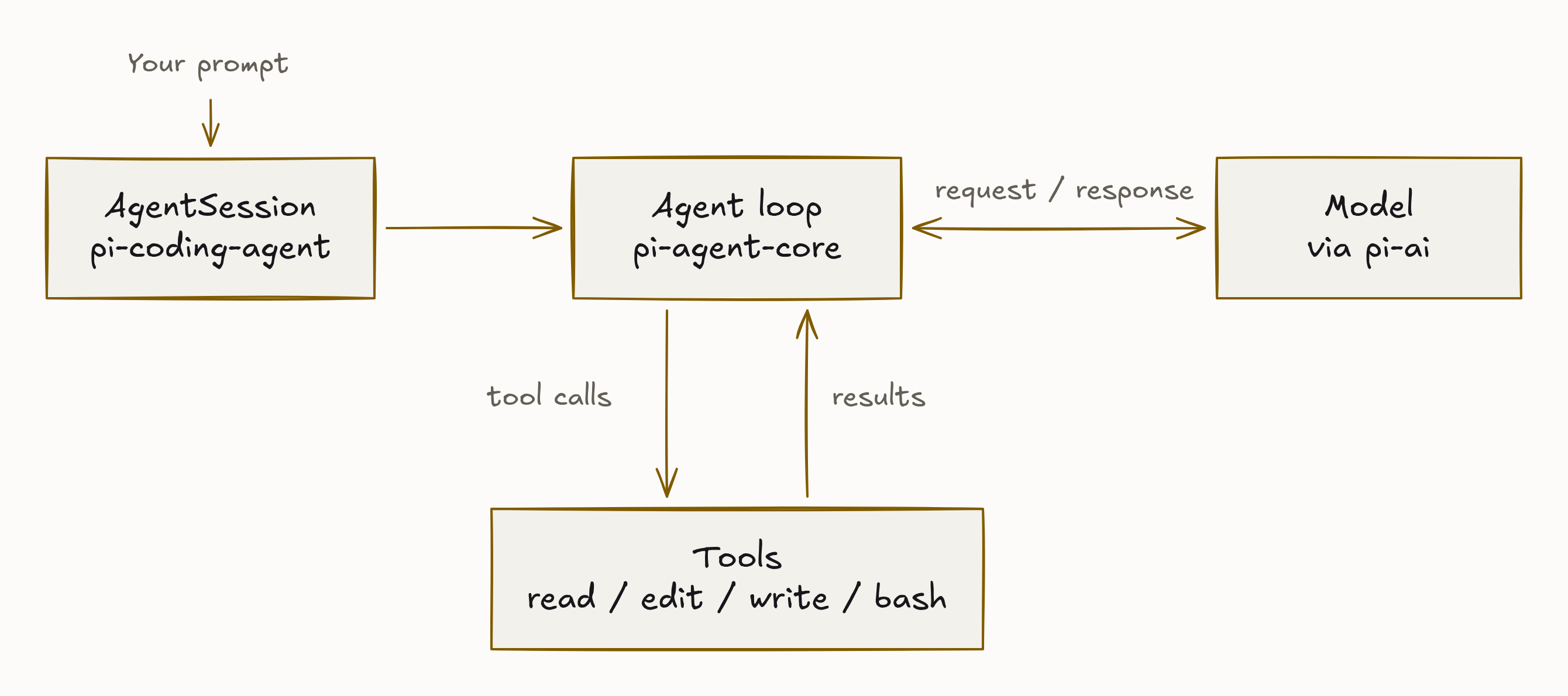
A sent prompt is “compiled” in the AgentSession class in pi-coding-agent which:
- Handles extension commands and expands requested skills or prompt templates.
- Checks the selected model and auth
- Checks whether the conversation needs compaction
- Lets extensions modify the input, add context or adjust the system prompt before the agent starts
Conversation history is managed by SessionManager, also in pi-coding-agent. It saves the session as JSONL and restores the relevant messages when we resume.
Then AgentSession passes the compiled messages to the Agent in pi-agent-core which starts the agent loop. The model receives the current conversation, system prompt and available tool definitions. Pi-ai handles the provider-specific API calls and streams the response back.
If the model requests a tool call, the loop finds the tool, validates its arguments and runs its implementation. For example,
- read: resolves the file path relative to the session’s working directory, checks readability and reads it using Node’s filesystem API. For text, it supports line ranges through offset / limit params, truncates oversized results and tells the model where to continue reading. It also supports images, returning image content rather than raw bytes.
- bash: starts a shell process in the session’s working directory, collects both stdout and stderr, and emits output updates while it runs. It supports cancellation and optional timeouts, and reports non-zero exit codes as tool errors. For oversized output, it returns the tail and saves the full output to a temporary file so model context doesn’t fill up.
We can also define custom tools through extensions using pi.registerTool(). These run through the same loop as the built-in tools.
As in ReAct style the tool result is added to the conversation and sent back to the model on the next call. The model can use that result to request more tools or respond with text. Normally, the loop ends when the model responds without tool calls and there are no queued messages left.
Throughout this process, Pi emits events for messages, turns and tool execution. Extensions can react to these events, and specific hooks let them modify context or block a tool call before it runs. These are the places where we will add our own behavior.
How do we extend Pi?
Pi lets us customize it without forking its source code. We will keep its core functionalities and add our own behaviour through extensions.
Let’s understand the default system prompt (which is of course changeable) of Pi.
You are an expert coding assistant operating inside pi, a coding agent
harness. You help users by reading files, executing commands, editing
code, and writing new files.

<tools>
{tool names and one-line descriptions}

In addition to the tools above, you may have access to other custom
tools depending on the project.
</tools>

<rules>
{tool-related guidelines}
- Be concise in your responses
- Show file paths clearly when working with files
</rules>

<docs>
Pi documentation (read only when the user asks about pi itself, its SDK,
extensions, themes, skills, or TUI):
{documentation paths and instructions for reading Pi's docs}
</docs>

<addendum>
{APPEND_SYSTEM.md contents, if configured}
</addendum>

<project_context>
Project-specific instructions and guidelines:

<project_instructions path="{instruction file path}">
{full AGENTS.md or other loaded instruction-file contents}
</project_instructions>
</project_context>

<skills>
{instructions explaining when and how to load skills}

<available_skills>
  <skill>
    <name>{skill name}</name>
    <description>{skill description}</description>
    <location>{path to SKILL.md}</location>
  </skill>
</available_skills>
</skills>

<cwd>
{cwd}
</cwd>
Each part lives in its own tag so when an extension changes one of them mid-session Pi only sends that part as an update and the cached prefix stays intact.
This system prompt is pretty standard: it injects available tools, skills and AGENTS.md into the prompt by default and also shows the documentation path for extending Pi so you can just start up a Pi session and prompt your way through customizing it however you want.
Here are a few ways of customizing Pi:
- AGENTS.md: Instructions about the project; it should include coding conventions, test/build commands etc. This is the standard way of adding extra instructions at startup time to system prompt for any harness and Pi also allows it. AGENTS.md content goes between
<project_context>tags in the system prompt above. - Skills: Reusable instructions for specific tasks, defined in a SKILL.md convention. They can also include scripts and reference files. Pi adds the skill’s name, description and location to
<available_skills>in the system prompt. The full instructions are loaded only when needed, while descriptions are always loaded; that’s how the agent understands which one it needs. - Prompt templates (commands): Reusable prompts saved as Markdown files. For example,
.pi/prompts/review.mdbecomes/review, which expands the file’s contents into our message. Templates can also accept arguments. These help us reuse common requests with ease. - TypeScript extensions: Code that changes Pi’s behaviour. We can register custom tools, add commands, react to lifecycle events, modify context and customize the TUI. We can put these in
.pi/extensions/for a project or~/.pi/agent/extensionsglobally, and use/reloadto pick up changes (useful when we are developing one in an active pi session as mentioned above). Most of our harness functionality will live here. - Themes: Customize the TUI’s colors. We can put theme files in
.pi/themesor~/.pi/agent/themesglobally. Pi hot-reloads the active theme from~/.pi/agent/themesso we can adjust the appearance while it is running, the project ones need a/reload. Changes to UI components or behaviour belong in extensions.
Anatomy of a TypeScript extension
A Pi extension is a TypeScript module that exports a function —which you can even use to play DOOM inside of Pi—. Pi calls this function when it loads the extension and gives it an ExtensionAPI object. We use this object to register our behaviour.
ExtensionAPI is the TypeScript interface describing the methods available on the pi object. These include pi.registerTool() for tools the model can call, pi.registerCommand() for user commands and pi.on() for event handlers. It also exposes methods for sending messages into the conversation and changing which tools are active. This is how our extension interacts with Pi without modifying its internals.
For example, we can create .pi/extensions/harness.ts:
import type { ExtensionAPI } from "@earendil-works/pi-coding-agent";

export default function (pi: ExtensionAPI) {
  pi.on("session_start", (_event, ctx) => {
    ctx.ui.notify("Harness loaded", "info");
  });

  pi.registerCommand("harness", {
    description: "Show the current working directory",
    handler: async (_args, ctx) => {
      ctx.ui.notify(ctx.cwd, "info");
    },
  });
}
This extension shows a notification when a session starts and adds a /harness command that displays the working directory.
pi.on() registers a handler for an event. The handler runs when that event happens. Similarly, pi.registerCommand() registers a command whose handler runs when we type /harness.
The ctx argument gives us access to the current session, including its working directory, selected model and UI methods. Here, ctx.cwd gives us the directory and ctx.ui.notify() displays it.
Once the project is trusted, /reload loads the extension. Pi handles loading the TypeScript, so we don’t need a separate build step.
Neither handler calls the model. /harness is a command for us to use. To add something the model can call, we register a tool with pi.registerTool() instead.
Crafting the coding harness
We will first learn which concepts are commonly used in popular coding harnesses.
We will then build our harness.
Harness design patterns
The ideas mentioned here can be found in almost every coding harness that is out there.
Using files as a memory system
As we have seen with SKILL.md and AGENTS.md it is common to use markdown files as memory/extra instructions besides the prompt. Besides these there are agent-written .md memory files. Claude Code has “auto memory”: during the session the agent saves user preferences as markdown under ~/.claude/projects/<project>/memory/ and later on these memory files are loaded by the agent when relevant.
Letta Code makes memory a versioned artifact. Memory lives in a git repository so every edit is a validated commit, and the memory that is in the context is the committed revision, not the working tree. In Letta there is an implementation of sleep-time memory too: a background reflection agent consolidates lasting lessons from the threads.
Subagents and background jobs
As the session goes on the context fills up with stuff the agent needed only once: a whole file it read to find one function, a long failing test log, documentation research on a framework it needs to use and so on. Subagents are the common way of keeping that noise out. The main agent hands a task to a fresh agent with its own context window, that agent does the digging and only its final answer comes back to the parent. Besides that, subagents also provide:
- Task Parallelism: Running several subagents at once mostly buys time and we pay for it with tokens. Eric Provencher from OpenAI argues that more than 2 subagents at a time rarely improves quality (obviously as of Oct 2026’s available frontier models maybe this gets better in future models), because agents end up re-checking each other’s work. Parallelism does pay off when the work splits into independent pieces that can be verified on their own. Nous Research refactored Hermes this way: the repo was split into 36 non-overlapping groups, each worker got its own git worktree and every step was checked against the original interfaces. For normal feature work where every agent needs to read the same files, it is mostly extra cost, which is why I find it overrated.
- Specialization: Each subagent can have its own role with a different system prompt and tool access. E.g. a specialized read-only agent that our main agent sends for scouting the codebase that uses a smaller model would save context for our main agent and provide cheaper token cost for us.
- Fresh eyes: A reviewer subagent that only sees the task and the diff, not the reasoning of the agent that wrote it, is less likely to agree with its mistakes. This reviewer can also be from a different family of models (e.g. using gpt for implementation and claude for reviewing).
Claude Code defines subagents as markdown files with a frontmatter (name, description, tools, model) and the main agent decides which one to use from the description, same trick as skills. Pi doesn’t ship subagents by default but it has an example implementation of it in the repo. Each subagent runs as a separate pi process in JSON mode, agents are markdown files like Claude Code’s, and it has single, parallel (up to 8 tasks per call, 4 running at once by default) and chain modes where each step gets the previous one’s output.
Background jobs are the same idea for commands. Some commands never end (dev servers, watchers) and some take a long time (full test suites, builds). Instead of blocking the agent until they exit, the harness starts them, gives back an id, and the agent keeps working and checks the output later or gets notified when it exits. Claude Code does this with a run_in_background flag on its bash tool. Pi’s bash tool waits until the command exits or times out, and the subagent example also blocks the parent until the children finish, so both are on us.
Can Bölük’s (maintainer of omp (oh-my-pi) harness) Harness Playbook has a good point about this: tool calls, subagents and background jobs are all a stream of work that needs limits, cancellation and a way to watch it, so they should be built on the same thing.
Lazy loading context
There is also one common concept for skills/tools/MCPs that is used for context budget management. Most of the time harnesses don’t load all available registered skills, tools/MCPs.
For skills only the ‘description’ field (which is a required field in skill specification so every skill must have it and it is char-capped) is loaded and then the agent activates the whole skill based on relevance to the task.
This is akin to lazy loading in classical software development.
For tools and MCPs there is a “tool_search” tool; the LLM uses this tool to progressively disclose (this is done by doing a lexical search on tool definitions) the needed tools for the task at hand. This is useful if your harness has many tools or MCPs (which expose tools to the model when activated) attached. Anthropic measured an 85% token reduction, and considerable accuracy gains: with fewer tools in context the model picks better ones (Opus 4 went from 49% to 74% on their evals).
Pi has this built in for MCP servers. Each server has an exposure setting: direct tools go into the prompt up front, codemode (default) and deferred ones stay out until the model finds them with tool_search (BM25 over tool names, descriptions and schemas) or calls them from codemode, and hidden ones are not reachable at all.
Auto Compaction
In long running sessions the context window eventually gets filled up. In order to prevent that most harnesses implement auto compaction (or compression).
There are usually 2 types of compaction, deterministic and LLM-summarization. Of course you don’t have to pick one of these two methods; they can be used together.
Deterministic compaction: Usually done with some mix of pruning tool call results and keeping only the last N tokens (N is usually 10 or 20k and tokens are usually estimated by char/4 formula).
LLM summarization: Well as the name suggests we leverage an LLM here to summarize what happened so far or parts of the context. Usually the LLM is prompted to output a markdown template containing goal, progress (done / blocked / in progress) constraints, user preferences, critical context etc.
The LLM here can be a small model (e.g. gpt-luna or haiku) or it can be the current session model to leverage the warm KV Cache (if applicable) and reduce costs.
Pi has a well-thought auto-compaction algorithm by default with configurable parameters:
- Estimate. Before each new prompt and between turns once tool results come in, Pi computes context tokens = the usage the provider reported for the last assistant message (
totalTokens, orinput + output + cacheRead + cacheWrite) plus an estimated token count for messages that came after it. - Trigger. Compacts when the estimate exceeds
contextWindow - reserveTokens. Besides this threshold it also fires on manual/compactand on overflow (a request already failed because the window is full).reserveTokensis a parameter we define; by default it is 16384 andcontextWindowis inferred from the model. BothreserveTokensandkeepRecentTokenscan also be set per model withcompaction.modelOverrides. - Cut point. Walk backwards from the end accumulating entries until roughly
keepRecentTokens(20000) of recent history, then snap forward to the nearest valid boundary: a user message, assistant message, bash execution, branch summary or previous compaction summary, never a tool result, so the tail never starts with an orphaned result. Parameter:keepRecentTokens. This is the tail the model keeps verbatim; bigger means less amnesia but more tokens carried. - Serialize the head. Everything before the cut is flattened to plain text:
[User]:,[Assistant]:,[Assistant tool calls]:with names and arguments,[Tool result]:truncated at 2000 chars (a hard constant,TOOL_RESULT_MAX_CHARS, not configurable), plus read/modified file lists extracted mechanically and carried over from the previous compaction entry. Thinking blocks are left out since providers only return a summary of the real reasoning anyway. - Summarize. One standalone call with the current session model (the conversation is flattened into a single user message, so no cache is reused, and Pi explicitly disables cache writes for it), a fixed system prompt (“Do NOT continue the conversation… ONLY output the structured summary”) and the strict template (Goal, Constraints & Preferences, Progress Done/In Progress/Blocked, Key Decisions, Next Steps, Critical Context).
/compactaccepts custom instructions, appended to the prompt as “Additional focus: …”, so you can do things like “/compact auth refactor”. This call uses the model’s own output limit, soreserveTokensonly decides when compaction starts. - Roll forward on re-compact. If there is a previous summary, it goes inside
<previous-summary>tags with the new messages and an update prompt (preserve everything, add new progress, move In Progress to Done, drop the irrelevant). - Persist and rebuild. A compaction entry (summary,
tokensBefore, retained tail, file lists) is appended to the append-only session log, nothing is deleted, and the next request is built as summary message + verbatim tail + everything after.
Thread Recap
Although this is not commonly implemented I believe this is a very useful feature for users who work on multiple projects at the same time or on multiple parts of the same project.
Essentially, when you leave a session for a while (in b4agent 3 minutes without a keystroke), the harness writes a short recap of the thread with emphasis on the last user message + last assistant turn and shows it above the input box, so it is already there when you come back. It reuses the session’s prompt cache so it costs very little, and it makes working on different threads more manageable.
Auto Permission Review
It is obvious that agents need filesystem access to read/write stuff and search tools in order to not hallucinate and be helpful. But if you are running agents locally with access to your personal files or agents have important project infra access like databases, prod etc., you will need a safe way of running them without constantly reviewing their tool calls. That would be a very inefficient way of spending your time unless you are learning a topic (a new language that you can’t code in efficiently, working on an ambitious weekend project etc.) with an agent. In that case I would argue that actually watching them work is a good learning experience, thus manual approval of tool calls is beneficial in that context.
Claude Code and Codex both have an auto-approval feature, they work like this:
- Claude Code: a second model reviews each action before it runs. Edits inside the project skip that review. Blocked actions go back to the agent with a reason, and repeated blocks hand control back to you.
- Codex: only actions that already need approval at the sandbox boundary go to a separate reviewer agent. Examples are commands that need more access, blocked network calls and file edits outside the allowed scope.
The classifier models (jev, clef, openai decisions etc.) would be excellent in this because of their speed and low cost.
Deciding on the features
If you are going to use a harness daily in your work I think the most important things are (in order):
- UI/UX — Most of the time you don’t need to understand what the agent is doing precisely but when you want to understand it there should be better ways of doing it other than looking at a terminal screen and following the wall of text. We will be having default skills (
/explain-diffand/archify) loaded in. These provide communication/understanding over HTML artifacts/diagrams rather than pure text. Also we will have “/btw” feature (a.k.a/sidein Codex) which lets you talk with the main agent in a side panel without corrupting the context window and “ask_user” tool for the main agent which lets you communicate much faster/better with the agent when your input is needed. Also from my experience tasteful themes / fonts also help! Making the agent interface on web or in an app would be better rather than in terminal for obvious reasons but it seems unrelated to this blog post so we skip building that part. - Doing needed stuff automatically — I was essentially going to name this auto compaction but I realized this goes further than just auto compaction. Your main agent should know its features and use them preemptively instead of you triggering them so you focus on the important parts without thinking about ‘how’ or constantly activating a slash command you should just talk to the agent. For example in b4agent the main agent sets up its own /loop schedules when it needs to check back on something, saves your preferences to memory and starts reviewer subagents when you ask for a review.
- Ergonomics — It should feel easy to use the harness. I should be able to just copy paste files and it should just work. I should have convenient shortcuts for commonly used stuff like changing models, effort levels, permission modes etc. I should be able to easily highlight text that the agent wrote and reference it in my prompt box so I can talk about it (instead of highlight → copy → paste it into prompt input we do highlight → press r → and it is auto copied to box. this idea is taken from Amp and I use this all the time).
- Performance / Cost — This is the 4th place in my list because honestly with the new frontier models unless your harness is actively fighting against the new generation of models, it doesn’t matter that much because the result will be within +/- 1-2% no matter what you do. I am of course talking about a general coding agent harness rather than a special one for a specific task. Cost on the other hand is much more important: if you are not providing a significant performance boost or much better developer experience your harness shouldn’t burn more token money than the baseline pi.
Building them
Now with all of this talk and decisions we have “b4agent” — an “opinionated” agent for coding work we have built on top of Pi. Let’s get to know the harness:
The launcher and the system prompt
b4agent is a small command that starts Pi with our extensions and keeps its state in ~/.b4agent/ instead of ~/.pi/, so it doesn’t mess with a normal Pi install. On the first run it writes default settings (gpt-6.1-sol at high effort through the ChatGPT login), our keybindings, and copies the existing Pi logins once.
All of the extensions are loaded together from one factory function, because they need to share state: the permission gate needs to know whether a checkpoint exists, the agent panel needs the list of running subagents and so on. Subagents load the same factory in “child mode”, which turns off the parts that only make sense for the main agent.
For the system prompt we replace Pi’s opening sentence with our own identity text and keep the rest of Pi’s sections (tools, rules, project context, skills, cwd). Then we add our own sections: the subagent types, memory and the environment. The important rule here is that a section must not change during a session. If it changes, the start of the request no longer matches what the provider has cached and we pay for the whole prompt again. I checked this in Pi’s source: none of the built-in models (including the ChatGPT login ones) accept a system message in the middle of the conversation, so a changed section gets folded back into the system prompt at the top. That’s why spec mode, which adds a section while it is on, costs one uncached turn when you turn it on and one when you turn it off.
Permissions: rules, then a reviewer, then you
There are three modes: manual (asks for everything that isn’t read-only), auto and yolo. Alt+M cycles them. Auto mode is the one I care about, it should be a safe yolo mode rather than a manual mode with fewer prompts. Every tool call goes through three steps:
- Rules. Bash commands are parsed into a syntax tree (with unbash) instead of being matched by regex, and wrappers like
sudo,timeout,bash -c,evalor$(...)are unwrapped first, sorm -rf /hidden in abash -cis still seen asrm -rf /. Read-only tools and read-only commands (the known-safe list from Codex) and edits inside the project run without asking. A short list is hard-denied in every mode, yolo included: deleting critical paths like/or your home folder,rm -rf "$DIR/"where an empty variable turns it intorm -rf /, formatting disks, fork bombs and turning off our own guard. Reading secrets (.env,~/.ssh, the auth file) always asks you. - The reviewer. Everything else goes to a classifier model first: Jev answers five yes/no questions about the call (does it destroy data, send data out, change shared state, run untrusted code, and did the user ask for it) and the answers are combined in code. If the result is unclear, an LLM reviewer (gpt-6-luna) takes a look. The reviewer sees your messages and the call itself, it doesn’t see the tool outputs, so a prompt injection in a web page or a file can’t pass its way through.
- You, only for what the reviewer doesn’t clearly allow.
To check that this is really a “free pass” most of the time, I replayed 3,949 tool calls from my own past sessions (in other harnesses) through it. 54 of them would have asked me, and 31 of those were Claude Code writing to its own memory folder, which doesn’t happen in b4agent. So roughly 99.4% of the calls ran without me. On a labeled set of risky and harmless calls, the reviewer missed nothing and didn’t ask unnecessarily, both on the set I tuned the thresholds on and on a held-out set.
Since auto mode lets the agent edit freely, we need a way back. Checkpoints snapshot the project’s files before every message you send (in a separate git repository, so your own git history is untouched) and /rewind restores the code, the conversation or both.
Subagents and background jobs
Subagent types are markdown files like Claude Code’s: search, librarian, historian, reviewer and security-reviewer. The first three are read-only helpers the agent starts on its own to gather context with a fresh window; the reviewers start when you ask for a review, and you can add your own types. Each child is a separate Pi session running in the same process. By default children work in the same checkout as the main agent, like almost every other harness does. If two of them need to edit the same files, the main agent can give one its own git worktree. Also an edit fails if the file changed since that agent last read it, so an agent re-reads instead of silently overwriting another agent’s work.
A child ends by calling submit with its result, optionally checked against a JSON schema. The main agent can also say how hard the task is (light, medium, heavy) to pick a cheaper or a stronger model.
/review starts reviewer subagents and every finding is labeled P0 to P3, and if there is nothing to fix the reviewer has to say exactly LGTM. An LLM asked to find problems will always find something, so “nothing to report” has to be an expected answer.
For background jobs, a bash command can start in the background, a command still running after 60 seconds moves there by itself, and Ctrl+B moves the current one. Finished jobs and subagents report back to the main agent, and a panel under the input box shows what is running.
Side chat and recap without paying for the context twice
/btw sends exactly the request the main agent would send next, with your question appended as the last message. That message starts with a note telling the model this is a side chat, that its answer won’t reach the main agent and that only read-only tools work here. Because everything before the note is unchanged, the provider serves it from cache. In a live test 57.3k of 58.0k input tokens came from the cache. The recap uses the same trick (5,504 of 5,783 tokens from cache).
Ergonomics
- Collapsed steps: a run of tool calls shows as one line like “Ran 3 commands, read 2 files, edited 1 file (+2 -1)”, and Ctrl+O expands them.
- Highlight-to-reference: select text in the transcript and press r to quote it in the input box (only in Pi’s fullscreen mode, where Pi owns the mouse selection).
- Tab changes the effort, Shift+Tab toggles spec mode, Alt+M the permission mode. At the model’s highest effort the input box turns into a rainbow.
- One thing I measured: on the ChatGPT login the cache is tied to the effort level, so changing effort mid-conversation makes the next turn uncached. The footer shows a “cold cache” hint when that happens.
The TUI
Pi’s TUI is already good, so most of what I added is small things that make it easier and tastier to use:
- Header: the logo, a small harness tip that changes on every launch, the shortcuts that are ours and how many skills and
AGENTS.mdfiles got loaded. (inspiration: Factory Droid) - Footer: three lines. First the folder, git branch and session name. Then tokens, how much of the prompt came from the cache, cost and context on the left, and the model and effort on the right. Last a row of chips: permission mode, spec mode, running jobs, files changed (
Δ2 +14 -3). - Auto titles: a small model names the session from your first prompt in the background.
- Themes: 19 bundled themes (catppuccin, tokyo-night, rose-pine, dracula, gruvbox, nord…) and
/themepreviews each one live while you move through the list. - Spinner: a small Pac-Man and a rotating word while the agent works. Mine are Turkish, you can put your own list in a file. (inspiration: Claude Code)
- Notifications: the terminal title shows ⚙ while the agent works and ✓ when it’s done, and the bell rings when a run is finished and you are away.
/changeslists every file the session changed with lines added and removed, and/usageshows your ChatGPT plan limits next to this session’s tokens and cost.- The agent panel under the input box: ↓ moves into it, Enter opens a subagent’s transcript while it runs and you can message it from there.
The rest
- Memory: a
MEMORY.mdindex per project and a global one. The first 200 lines go into the system prompt, and the agent reads the rest and the topic files when it needs them. - Subfolder AGENTS.md: when the agent first touches a folder, that folder’s
AGENTS.mdis added to the tool result instead of the system prompt, so the cache stays intact. web_searchthrough the ChatGPT login andweb_fetch, which refuses private addresses and marks everything it returns as untrusted.- Hooks in Claude Code’s format, so existing hooks work as they are.
/loopand schedules that the agent can set up and clear for itself.- Bundled skills: explain-diff, archify, skill-creator, prompt-audit, test-audit, office document skills (docx, xlsx, pdf, pptx) from Hermes Agent.
- Verification skills: create-verification-skill and maintain-verification-skill from pstack. The first writes a project skill that tells the agent how to launch your app, drive it like a user would and keep the evidence. The second keeps that skill up to date as the app changes. With them the agent can show a change works end to end instead of only passing unit tests, so you need to check less yourself.
Evaluating our coding harness
Let’s evaluate our coding harness. As I said I am not fully aiming for performance but for ergonomics and DX side of things so we will not be hillclimbing on evals. The main point of doing this is basically finding out token-heavy patterns if any and eliminating them if they are not providing any performance boost.
The setup for evaluation is straightforward:
- A subset of terminal bench 4.0 (10 tasks — I will be focusing on Python and Typescript tasks because they are mostly what I do with agents —)
- Minimal pi on one hand and our harness on the other
- And running each task 3 times
Then we will be inspecting basic stats like test pass rate, token usage, tool call counts etc. and agent traces to see how our harness behaves.
The setup in detail
Both sides ran the same model (gpt-6.1-sol on high thinking) with the same environment. We used Harbor, which ran every task in its own local Docker container. b4agent ran in auto mode and anything that would have asked me got blocked instead; this happened 2 times and the agent still finished the task.
b4agent also spends tokens outside its main session: subagents, the permission reviewer and auto-titles. So b4agent logs each of those calls and they are added to its totals.
Results
| Pi 1.4.0 | b4agent | |
|---|---|---|
| Tasks solved | 15/30 (50.0%) | 14/30 (46.7%) |
| Tests passed | 94.5% | 94.8% |
| Input tokens per run | 0.79M | 2.04M |
| Read from cache | 96% | 93% |
| Output tokens per run | 23.5k | 36.3k |
| Cost per run (API price) | $0.38 | $1.47 |
| Tool calls per run | 40.2 | 52.5 |
| Median run time | 8.9 min | 9.5 min |
Per task (solved / attempts, share of tests passed):
| Task | Pi 1.4.0 | b4agent |
|---|---|---|
| batched-eval-parity | 1/3, 73% | 1/3, 73% |
| embedding-drift-monitor | 0/3, 91% | 0/3, 91% |
| html-js-filter | 0/3, 50% | 1/3, 67% |
| nextjs-performance | 3/3, 100% | 3/3, 100% |
| ontology-kg-querying | 0/3, 62% | 0/3, 67% |
| photonic-waveguide-routing | 3/3, 100% | 3/3, 100% |
| react-lead-form | 0/3 | 0/3 |
| risk-scorer-replay | 3/3, 100% | 3/3, 100% |
| session-window-debug | 2/3, 95% | 0/3, 86% |
| wal-recovery-ordering | 3/3, 100% | 3/3, 100% |
Digging into the results
Where the extra tokens go
b4agent costs about 4 times as much per run, and 69% of that is spent outside the main session. The main agent alone costs $0.46 per run, close to what Pi spends in total. The rest, summed over 30 runs:
- Oracle (gpt-6-astra): $12.88. The agent started one in every run.
- Reviewer subagent (gpt-6-astra): $11.14, in 22 of 30 runs.
- Worker subagents (gpt-6.1-sol): $5.37, in 25 runs.
- Security reviewer (gpt-6-astra): $1.00, in the 3 html-js-filter runs.
- Permission reviewer: 315 Jev calls at practically no cost, and the LLM fallback was needed only 9 times.
The oracle part is easy to explain. The system prompt tells the agent to consult it “on hard tasks after orienting and before substantive work”, and on a benchmark run every task looks hard. The reviewer is supposed to start only when the user asks for a review, but the agent started one on its own to check its finished work.
What we change
Without overfitting to these 10 tasks or trying to make the harness better just for them, we will instead make small changes that make sense in day to day usage:
- Oracle when stuck, not up front. Consult it after an attempt fails, when errors keep coming back or before changing approach. This will be a system prompt change.
- Reviewer only when it earns it. When the user asks, or when the change is large or security-sensitive. html-js-filter shows that second case is worth keeping.
- Check the spec before finishing. If the project has a spec, list its musts and must-nots and check each one against the code. The reviewer gets the spec files and does the same.
- Test the way the caller runs it. Run the project’s tests in the environment they are configured for, and don’t add a code path that only runs where it can’t be tested.
Re-testing
I applied those changes and reran b4agent on the same 10 tasks (v2). The oracle now started in 11 runs instead of 30 and the reviewer in 10 instead of 22, so the cost dropped from $1.47 to $0.99 per run. But it solved 12 tasks instead of 14 and was still 2.6 times as expensive as Pi. The rules in the prompt didn’t actually fix anything, they just moved the numbers around.
Cutting it down
So I stopped adding rules and started removing pieces one at a time, on the same 10 tasks. If the score didn’t drop without a piece, it went. I also read/analyzed the traces of every run that used a subagent to see how the agent was actually using them.
- Oracle. The agent mostly asked it to confirm a plan it already had: its questions usually contained the answer, and 145 of 217 replies were some form of “proceed”. It also can’t run code, so on one task it read a design doc literally and told the agent not to fix a reported bug, in 9 runs out of 9. I rewrote it along the lines of Anthropic’s advisor tool: it reads the whole conversation and treats every problem the user states as a requirement. That fixed the bad advice, but the harness still solved 3 fewer tasks with it than without, at twice the cost, because each call resends the conversation uncached. Last try: gpt-6-luna doing the work with gpt-6.1-sol as its oracle. Luna asked it 3 times in 30 runs and didn’t act on the advice. So this agent is removed.
- General workers. 47 of 108 worker starts were just second opinions, and the briefs paraphrased the task and lost details on the way, the “telephone game” from Anthropic’s post on folding subagents into the main agent loop. Runs with and without workers passed at the same rate. Removed, together with messaging between agents.
- Reviewers. The agent kept starting them on its own to check finished work. The security reviewer can’t run an attack against the code, so it mostly said LGTM, and runs that used it passed less often than runs that didn’t. Reviewers now start only when you ask (
/review,/security-review).
What’s left are three read-only helpers (search, librarian and historian) for gathering context in a fresh window, and a shorter system prompt.
| Pi 1.4.0 (two runs) | b4agent v1 | b4agent v2 | b4agent now | |
|---|---|---|---|---|
| Tasks solved | 15/30, 14/30 | 14/30 | 12/30 | 19/30 |
| Tests passed | 94.5%, 94.8% | 94.8% | 94.1% | 96.2% |
| Cost per run (API price) | $0.38, $0.37 | $1.47 | $0.99 | $0.48 |
| Median run time | 8.9, 6.8 min | 9.5 min | 8.7 min | 10.6 min |
The helpers weren’t started in any of these runs, and with no subagents at all the same harness solved 16, so most of the gap to Pi is noise from 3 attempts per task. On 4 tasks I never looked at, b4agent and Pi both solved 4 of 12.
So b4agent is about as good as or better in some cases than Pi at about 25% more cost, where it used to cost 4 times as much. I’m fine with that: I built it for permissions, /btw, recap, memory and the TUI, not to beat Pi on a benchmark. What I take away is that every subagent I added because it sounded smart cost money and didn’t help, and the agent did better with fewer of them.
Final words
We started from Pi, a minimal harness, and built b4agent on top of it with extensions only: permissions with an automatic reviewer, checkpoints, spec mode, /btw, recap, memory, background jobs and a TUI. Then we measured it against plain Pi on Terminal-Bench, found where the tokens went and cut everything that didn’t earn its place. It ended up about as good as Pi for about 25% more cost, with all the things I wanted for daily use.
There is still a lot I want to do. The biggest one is a GUI. A terminal is fine for driving an agent, but following what it did (diffs, subagent transcripts, HTML artifacts) is much nicer in a real window. Instead of building one from scratch, I want to connect b4agent to an existing open-source agent GUI through Pi’s RPC mode, so the harness stays the same and only the front end changes. I would also like to rerun the benchmark with more attempts per task, because 3 is too few to tell small differences apart.
You can check out the harness on GitHub: b4agent-tui. If you build your own harness from scratch or on top of Pi, I hope this write-up helps.